
6 May 2026
Mastering the Pain Point Dashboard
Written By:
Tiller Team
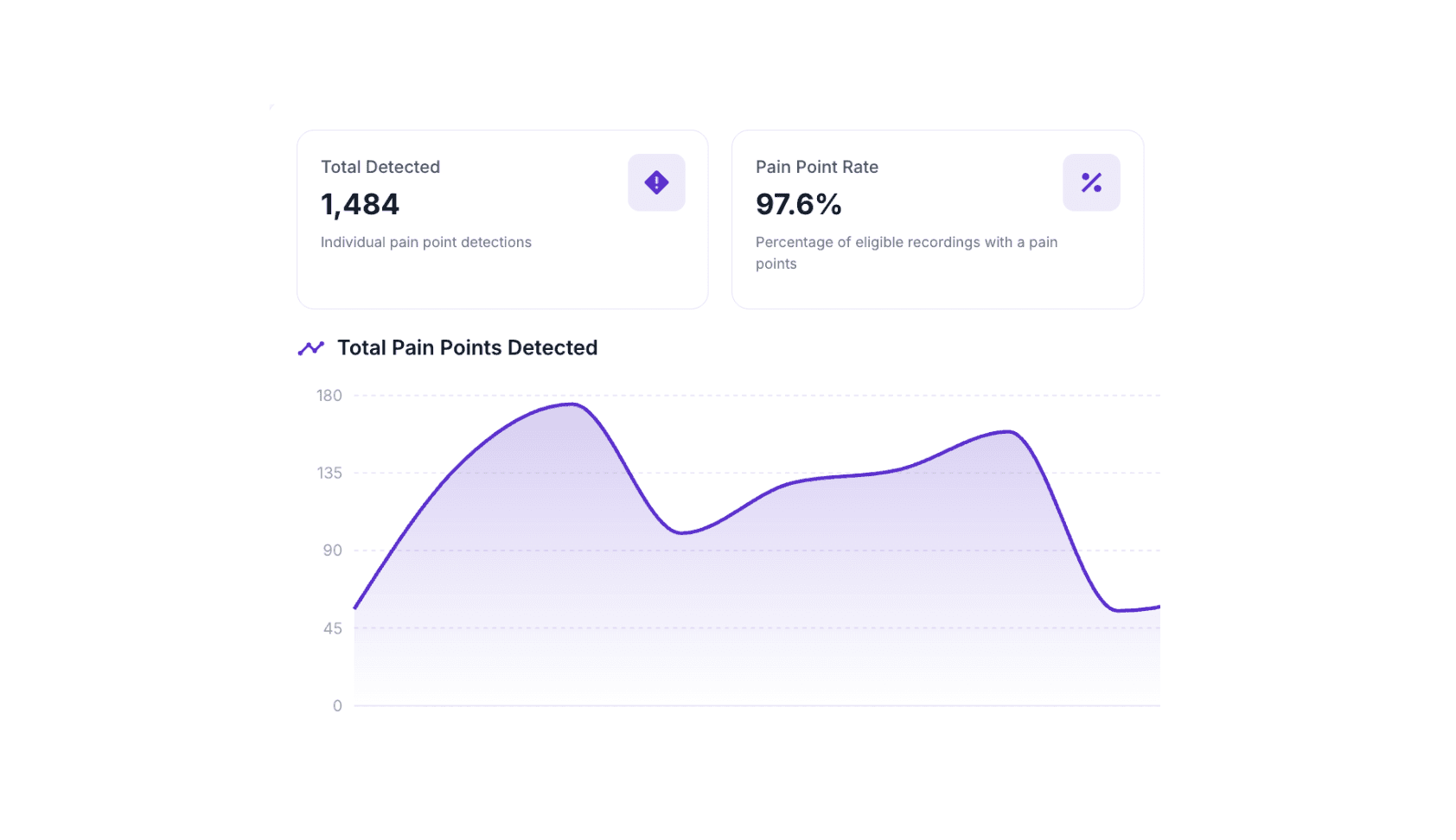
In the world of high-performance sales, discovery is everything. The Pain Point page isn't just about finding "problems", it's about uncovering the why behind every purchase. For sales teams, identifying a pain point is the first step toward a closed deal.
This dashboard serves as your command centre for quantifying customer needs and ensuring your team is doing the deep discovery work required to win.
Core Features & Capabilities
The page is built around a suite of intelligence tools designed to pull clarity out of conversation data:
Pain Point Dashboard: A unified, high-level view of every friction point detected across your recorded customer interactions.
Ask Ari (AI Assistant): A natural language power tool. Instead of digging through spreadsheets, you can simply ask Ari specific questions about your data.
Global Filters & Timeframes: Slice your data by date or organisational level (Company-wide vs. Team-specific) to find exactly what you need.
Trend Analytics: Visual tracking of "Total Detected" issues over time, showing you if your discovery efforts are becoming more effective.
Intelligent KPIs: * Pain Point Rate: The frequency of issues appearing in your calls.
Impact Score: A 0–10 metric measuring the business severity of an issue.
Discovery Depth: A 1–4 metric showing how deep the AI had to "dig" into the context to find the problem.
Prioritisation Table: A granular list of specific issues (like "Data Security" or "Training Gaps") paired with priority levels and discovery metrics.
Actionable Insights: What You Can Do
Data is only useful if it leads to a decision. Here is how you can put these features to work:
Audit Team Discovery: Use the "By User" breakdown to see which sellers are actually uncovering pain and which ones are just "pitching."
Measure Sentiment Shifts: Compare current detection percentages against previous months to see if your discovery questions are hitting home.
Quantify Business Risk: Sort by Avg Impact Score to help leadership prioritise technical fixes or sales hurdles that carry the most weight.
Investigate Specific Issues: Use Ask Ari for deep dives, such as: "Which customers mentioned 'Data Security' most often in the last two weeks?"
Optimize Sales Strategy: Identify "Upsell" opportunities that are currently being flagged as pain points to help marketing refine their messaging.
Track Regulatory Health: Monitor compliance-related tags to ensure your team stays on the right side of legal standards.
The Benefits: Impact by User Role
The more pain points a seller uncovers, the higher the likelihood of closing. By categorising these insights, every member of the organisation gains a specific edge:
For Sales & Success Leaders
Ending the "Pitch-Fest": Identify sellers who have a low "Discovery Depth." This helps you catch reps who show up and pitch features rather than asking the hard questions to find the customer's true pain.
Correlating Discovery to Revenue: See the direct link between a high "Pain Point Rate" and higher win rates, proving to the team that more discovery equals more closed deals.
For Individual Sellers
Building a Business Case: Use the Impact Score to prove to a prospect exactly why they can't afford not to buy your solution.
Self-Correction: Sellers can monitor their own "Pain Point Rate" to ensure they aren't glossing over discovery and moving to the demo too quickly.
For Product & Marketing Managers
Validation of Effort: Use Trend Analytics to see if a new feature launch actually decreased the "Pain Point Rate" for specific technical hurdles.
Messaging Refinement: Turn common customer "pains" into "gains" by updating marketing collateral to address the most frequently detected issues.
For Executive Leadership
Risk Mitigation: High-level visibility into "Compliance and Regulatory" trends ensures the company stays protected.
ROI Tracking: Quantify the business impact of friction using the Impact Score, turning abstract "customer complaints" into hard data for roadmap planning.
Quick Tip: If your Pain Point Rate is sitting at 100%, celebrate! It means your sellers are successfully uncovering a reason to buy in every single call. Use the Discovery Depth filter to see who is finding the "hidden" pains versus the obvious ones.
From the Tiller Blog:
Introducing Customer Intelligence
A 22% lift in upsell opportunities, instant handovers, and 15 hours back a month — see Customer View in action.
10 September 2026
Objection Handling Fact Sheet
What the data says about which objection-handling tactics actually close deals — and where the standard sales playbook quietly loses winnable ones.
17 August 2026

Tiller vs Fireflies: record a meeting or have a better meeting?
Factual comparison of Tiller (real-time sales and customer success call coaching, deal-risk alerts, deal scoring) and Fireflies (AI meeting transcription, CRM sync, post-call conversation intelligence), covering who each is built for."
17 August 2026